M2E quick fix – not up-to-date pom.xml

Recently, I have started using Apache Maven within Eclipse with m2e plugin. It helps me a lot as I can make many things within eclipse. This plugin  stills needs development (as has many open bugs), but since now I have not face something that I cannot overcome it.

An annoying problem that sometimes this plugin cause is that marks a project with error icon. If you see Markers View you will see an error of type “Maven Configuration Problem” saying:

Project configuration is not up-to-date with pom.xml. Run project configuration update

A quick workaround is this:

  1. Open Marker View
  2. Right-click on the Error message
  3. Select Quick Fix
  4. Click Finish

Regards,
Adrianos Dadis.

Democracy requires Free Software

Posted in Java | Tagged , , | 16 Comments

Beneficial CountDownLatch and tricky java deadlock

Have you ever used java.util.concurrent.CountDownLatch ??

It’s a very convenience class to achieve synchronization between two or more threads, where allows one or more threads to wait until a set of operations being performed in other threads completes (check javadoc and this post). CountDownLatch can save your time in suitable cases and you have to be aware of this class.

As always synchronization of threads can raise deadlocks if code is not good. And as concurrency use cases can be very complex, developers must be very careful. I will not describe here a complex concurrency problem, but a simple problem that you may face it if you use CountDownLatch careless.

Assume you have 2 threads (Thread-1 and Thread-2) that share a single java.util.concurrent.ArrayBlockingQueue and you want to synchronize them using a CountDownLatch. Check this simple example:

package gr.qiozas.simple.threads.countdownlatch;

import java.util.concurrent.ArrayBlockingQueue;
import java.util.concurrent.CountDownLatch;

public class DeadlockCaseCDL {

    public static void main(String[] args) throws InterruptedException {
		CountDownLatch c = new CountDownLatch(1);
		ArrayBlockingQueue b = new ArrayBlockingQueue(1);

		new Thread(new T1(c, b)).start();
		new Thread(new T2(c, b)).start();
    }

    private static class T1 implements Runnable {
        private CountDownLatch c;
        private ArrayBlockingQueue b;
        private T1(CountDownLatch c, ArrayBlockingQueue b) {
            this.c = c; this.b = b;
        }
        public void run() {
		  try {
		    b.put(234);
		    b.put(654);
		    doWork(T1.class);
		    c.countDown();
		    doWork(T1.class);
		  } catch (InterruptedException ex) {}
	   }
    }

    private static class T2 implements Runnable {
        private CountDownLatch c;
        private ArrayBlockingQueue b;
        private T2(CountDownLatch c, ArrayBlockingQueue b) {
            this.c = c; this.b = b;
        }
        public void run() {
		  try {
		    doWork(T2.class);
		    c.await();
		    doWork(T2.class);
		    System.out.println("I just dequeue "+b.take());
		    System.out.println("I just dequeue "+b.take());
		  } catch (InterruptedException ex) {}
	   }
    }

    private static void doWork(Class classz) {
        System.out.println(classz.getName()+" do the work");
    }
}

What you see above is that main thread creates a CountDownLatch with count “1” and an ArrayBlockingQueue with capacity “1” and afterwards spawns the “2 threads”. The ArrayBlockingQueue will be used for the real “work” (enqueue and dequeue) and the CountDownLatch will be used to synchronize the threads (enqueue must be done before dequeue).

Thread-1 enqueues 2 messages and Thread-2 wants to dequeue them, but only after Thread-1 has enqueued both messages. This synchronization is guaranteed by CountDownLatch. Do you believe that this code is OK??
No, it is not as causes a deadlock!!!

If you see carefully line 10, you will see that I initialize ArrayBlockingQueue with capacity equal to “1”. But Thread-1 wants to enqueue 2 messages and then release the lock (of CountDownLatch), in order to be consumed afterwards by Thread-2. The capacity “1” of queue blocks Thread-1 until another thread dequeue one message from queue, and then tries again to enqueue the 2nd message. Unfortunately, only Thread-2 dequeues messages from queue, but because Thread-1 hold the lock of CountDownLatch, the Thread-2 cannot dequeue any message and so it blocks. So, we really have a deadlock as both threads are blocked (waiting to acquire different locks). Thread-1 waits for ArrayBlockingQueue lock and Thread-2 for CountDownLatch lock (you can see it also in the related Thread Dump below).

If we increase the capacity of the queue then this code will run without problems, but this is not the point of this article. What you have to understand is that CountDownLatch must be used with care, in order to avoid such dangerous cases. You have to know the functional cases of your class, elaborate to other developers of team for this functionality, write useful javadoc and always write code that is robust in extreme cases, not only for happy paths.

Another point that you may help you is that this deadlock is not detected by modern JVMs. Try it.

As you may know, modern JVMs (both Hotspot and JRockit) are able to detect simple deadlocks and report them on Thread Dump. See a simple deadlock example that detected from Hotspot JVM:

Found one Java-level deadlock:
=============================
"Thread-6":
waiting to lock monitor 0x00a891ec (object 0x06c616e0, a java.lang.String),
which is held by "Thread-9"
"Thread-9":
waiting to lock monitor 0x00a8950c (object 0x06c61708, a java.lang.String),
which is held by "Thread-6"

You can try DeadlockCaseCDL and get a Thread Dump (on GNU/Linux run just “kill -3jvm_pid›”). You will see that thread dump looks normal and no deadlock is detected by JVM, but you are on a deadlock!!! So, be aware that this kind of deadlock is not detected by JVM.

Check this Thread Dump example from my local execution:

Full thread dump Java HotSpot(TM) Server VM (17.1-b03 mixed mode):

"DestroyJavaVM" prio=10 tid=0x0946e800 nid=0x5382 waiting on condition [0x00000000]
   java.lang.Thread.State: RUNNABLE

"Thread-1" prio=10 tid=0x094b1400 nid=0x5393 waiting on condition [0x7c79a000]
   java.lang.Thread.State: WAITING (parking)
	at sun.misc.Unsafe.park(Native Method)
	- parking to wait for   (a java.util.concurrent.CountDownLatch$Sync)
	at java.util.concurrent.locks.LockSupport.park(LockSupport.java:158)
	at java.util.concurrent.locks.AbstractQueuedSynchronizer.parkAndCheckInterrupt(AbstractQueuedSynchronizer.java:811)
	at java.util.concurrent.locks.AbstractQueuedSynchronizer.doAcquireSharedInterruptibly(AbstractQueuedSynchronizer.java:969)
	at java.util.concurrent.locks.AbstractQueuedSynchronizer.acquireSharedInterruptibly(AbstractQueuedSynchronizer.java:1281)
	at java.util.concurrent.CountDownLatch.await(CountDownLatch.java:207)
	at gr.qiozas.simple.threads.countdownlatch.DeadlockCaseCDL$T2.run(DeadlockCaseCDL.java:50)
	at java.lang.Thread.run(Thread.java:662)

"Thread-0" prio=10 tid=0x094afc00 nid=0x5392 waiting on condition [0x7c7eb000]
   java.lang.Thread.State: WAITING (parking)
	at sun.misc.Unsafe.park(Native Method)
	- parking to wait for   (a java.util.concurrent.locks.AbstractQueuedSynchronizer$ConditionObject)
	at java.util.concurrent.locks.LockSupport.park(LockSupport.java:158)
	at java.util.concurrent.locks.AbstractQueuedSynchronizer$ConditionObject.await(AbstractQueuedSynchronizer.java:1987)
	at java.util.concurrent.ArrayBlockingQueue.put(ArrayBlockingQueue.java:252)
	at gr.qiozas.simple.threads.countdownlatch.DeadlockCaseCDL$T1.run(DeadlockCaseCDL.java:29)
	at java.lang.Thread.run(Thread.java:662)

"Low Memory Detector" daemon prio=10 tid=0x0947f800 nid=0x5390 runnable [0x00000000]
   java.lang.Thread.State: RUNNABLE

"CompilerThread1" daemon prio=10 tid=0x7cfa9000 nid=0x538f waiting on condition [0x00000000]
   java.lang.Thread.State: RUNNABLE

"CompilerThread0" daemon prio=10 tid=0x7cfa7000 nid=0x538e waiting on condition [0x00000000]
   java.lang.Thread.State: RUNNABLE

"Signal Dispatcher" daemon prio=10 tid=0x7cfa5800 nid=0x538d waiting on condition [0x00000000]
   java.lang.Thread.State: RUNNABLE

"Finalizer" daemon prio=10 tid=0x7cf96000 nid=0x538c in Object.wait() [0x7cd15000]
   java.lang.Thread.State: WAITING (on object monitor)
	at java.lang.Object.wait(Native Method)
	- waiting on  (a java.lang.ref.ReferenceQueue$Lock)
	at java.lang.ref.ReferenceQueue.remove(ReferenceQueue.java:118)
	- locked  (a java.lang.ref.ReferenceQueue$Lock)
	at java.lang.ref.ReferenceQueue.remove(ReferenceQueue.java:134)
	at java.lang.ref.Finalizer$FinalizerThread.run(Finalizer.java:159)

"Reference Handler" daemon prio=10 tid=0x7cf94800 nid=0x538b in Object.wait() [0x7cd66000]
   java.lang.Thread.State: WAITING (on object monitor)
	at java.lang.Object.wait(Native Method)
	- waiting on  (a java.lang.ref.Reference$Lock)
	at java.lang.Object.wait(Object.java:485)
	at java.lang.ref.Reference$ReferenceHandler.run(Reference.java:116)
	- locked  (a java.lang.ref.Reference$Lock)

"VM Thread" prio=10 tid=0x7cf92000 nid=0x538a runnable

"GC task thread#0 (ParallelGC)" prio=10 tid=0x09475c00 nid=0x5383 runnable

"GC task thread#1 (ParallelGC)" prio=10 tid=0x09477000 nid=0x5384 runnable

"GC task thread#2 (ParallelGC)" prio=10 tid=0x09478800 nid=0x5385 runnable

"GC task thread#3 (ParallelGC)" prio=10 tid=0x0947a000 nid=0x5387 runnable

"VM Periodic Task Thread" prio=10 tid=0x09489800 nid=0x5391 waiting on condition

JNI global references: 854

Heap
 PSYoungGen      total 14976K, used 1029K [0xa2dd0000, 0xa3e80000, 0xb39d0000)
  eden space 12864K, 8% used [0xa2dd0000,0xa2ed1530,0xa3a60000)
  from space 2112K, 0% used [0xa3c70000,0xa3c70000,0xa3e80000)
  to   space 2112K, 0% used [0xa3a60000,0xa3a60000,0xa3c70000)
 PSOldGen        total 34304K, used 0K [0x815d0000, 0x83750000, 0xa2dd0000)
  object space 34304K, 0% used [0x815d0000,0x815d0000,0x83750000)
 PSPermGen       total 16384K, used 1739K [0x7d5d0000, 0x7e5d0000, 0x815d0000)
  object space 16384K, 10% used [0x7d5d0000,0x7d782e90,0x7e5d0000)

Regards,
Adrianos Dadis.

Democracy requires Free Software

Posted in Java, Software Development | Tagged , , , | 12 Comments

Reduce lock granularity – Concurrency optimization

Performance is very important in high load multithreading applications. Developers must be aware of concurrency issues in order to achieve better performance. When we need concurrency we usually have a resource that must be shared by two or more threads. In such cases we have a race condition, where only one of the threads will acquire the lock (on resource) and all the other threads that want the lock will block. This synchronization feature does not come for free; Both JVM and OS consume resources in order to provide you with a valid concurrency model. The three most fundamental factors that makes concurrency implementation resource intensive are:

  • Context switching
  • Memory synchronization
  • Blocking

In order to write optimized code for synchronization you have to be aware of these 3 factors and how to decrease them. There are many things that you must watch out when writing such code. In this article I will show you a technique to decrease these factors by reducing lock granularity.

Starting with the basic rule: Do not hold the lock longer than necessary.

Do whatever you need to do before acquire the lock, use the lock only to act on synchronised resource and release it immediately. See a simple example:

public class HelloSync {
	private Map dictionary = new HashMap();
	public synchronized void borringDeveloper(String key, String value) {
		long startTime = (new java.util.Date()).getTime();
		value = value + "_"+startTime;
		dictionary.put(key, value);
		System.out.println("I did this in "+((new java.util.Date()).getTime() - startTime)+" miliseconds");
	}
}

In this example we violate the basic rule, because we create two Date objects, call System.out.println(), and do many String concatenations. The only one action that needs synchronization is action: “dictionary.put(key, value);” Alter the code and move synchronization from method scope to this single line. A slightly better code is this:

public class HelloSync {
	private Map dictionary = new HashMap();
	public void borringDeveloper(String key, String value) {
		long startTime = (new java.util.Date()).getTime();
		value = value + "_"+startTime;
		synchronized (dictionary) {
			dictionary.put(key, value);
		}
		System.out.println("I did this in "+((new java.util.Date()).getTime() - startTime)+" miliseconds");
	}
}

Above code can written even better, but I just want to give you the idea. If wondering how check java.util.concurrent.ConcurrentHashMap.

So, how can we reduce lock granularity? With a short answer, by asking for locks as less as possible. The basic idea is to use separate locks to guard multiple independent state variables of a class, instead of having only one lock in class scope. Check this simple example that I have seen it in many applications.

public class Grocery {
	private final ArrayList fruits = new ArrayList();
	private final ArrayList vegetables = new ArrayList();
	public synchronized void addFruit(int index, String fruit) {
		fruits.add(index, fruit);
	}
	public synchronized void removeFruit(int index) {
		fruits.remove(index);
	}
	public synchronized void addVegetable(int index, String vegetable) {
		vegetables.add(index, vegetable);
	}
	public synchronized void removeVegetable(int index) {
		vegetables.remove(index);
	}
}

The grocery owner can add/remove fruits and vegetables in/from his grocery shop. This implementation of Grocery guards both fruits and vegetables using the base Grocery lock, as the synchronization is done on method scope. Instead of this fat lock, we can use two separate guards, one for each resource (fruits and vegetables). Check the improved code below.

public class Grocery {
	private final ArrayList fruits = new ArrayList();
	private final ArrayList vegetables = new ArrayList();
	public void addFruit(int index, String fruit) {
		synchronized(fruits) fruits.add(index, fruit);
	}
	public void removeFruit(int index) {
		synchronized(fruits) {fruits.remove(index);}
	}
	public void addVegetable(int index, String vegetable) {
		synchronized(vegetables) vegetables.add(index, vegetable);
	}
	public void removeVegetable(int index) {
		synchronized(vegetables) vegetables.remove(index);
	}
}

After using two guards (splitting the lock) we will see less locking traffic than the original fat lock would have. This technique works better when we apply it on locks that have medium lock contention. If we apply it on locks that have slight contention, then the gain is small, but still positive. If we apply it on locks that have heavy contention, then the result is not always better and you must be aware of this.

Please use this technique with conscience. If you suspect that this is a heavy contention lock then please follow these steps:

  1. Confirm the traffic of your production requirements, multiple it by 3 or 5 (or even 10 even if you want to be prepared).
  2. Run the appropriate tests on your testbed, based on the new traffic.
  3. Compare both solutions and only then choose the most appropriate.

There are more techniques that can improve synchronization performance, but for all techniques the basic rule is one: Do not hold the lock longer than necessary.
This basic rule can be translated to “asking for locks as less as possible” as I have already explained you, or to other translations(solutions) which I will try to describe them in future articles.

Two more important advices:

  • Be aware of classes in java.util.concurrent package (and subpackages) as there are very clever and useful implementations.
  • Concurrency code most times can be minimized by using good design patterns. Always have in mind Enterprise Integration Patterns, they can save your nights.

Regards,
Adrianos Dadis.

Democracy requires Free Software

Posted in Java, Software Development | Tagged , , , | 4 Comments

Version control branching strategies 2/2

Hi again, the topic is again version control branching strategies and release management.

A few months ago, I wrote the “rules” of our release management procedure (see part1). WOW, this 2nd post takes as much time as to write a new release of the code. I excuse myself for the delay, as I live in Greece and summer is so great that no one can resist on sunny beaches and colourful sea.

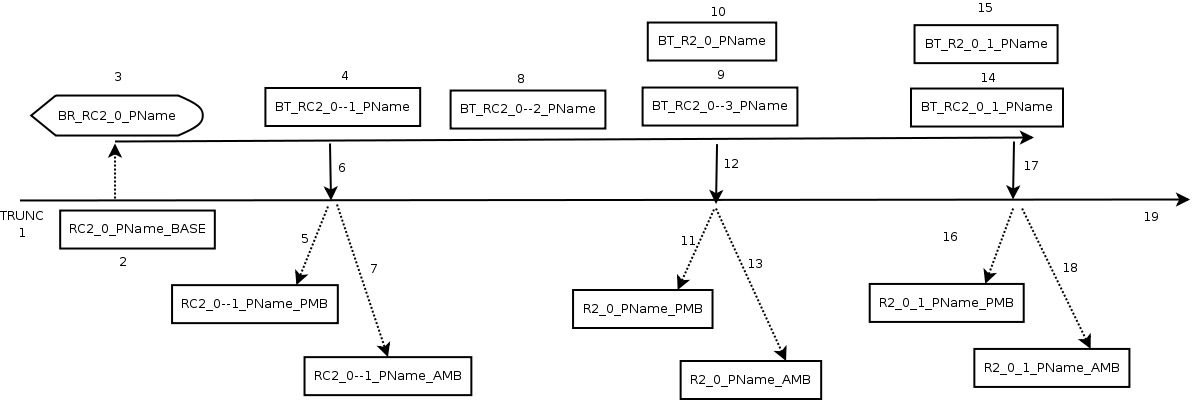
OK, it’s time for the simple release management example. As at most times, an image is better than thousands of words. This is not always true, try to find an image to explain wise. I am sure you cannot 🙂 So many books have written, but still we cannot understand/define wise. So sad for human kind…. Let’s go to something more simple like release management. So, check the following image:

Branching Example

Release Candidate scenario of application PName:

  1. Development is done on TRUNC and all developers work there. Application is at stable release 1_9. and after a lot changes want to go to release 2_0. The underscore is used instead of dot to comply with most version control software variants (CVS is not accept the dot in tags)
  2. When developer finish his unit testing and as many integration tests he could accomplish, then decide that application is ready for integration and acceptance tests and so he creates a Tag on trunk with name ‘RC_2_0_PName_BASE’. This the release candidate timestamp on TRUNK, as tags are timestamps.
  3. Release Candidate 2_0 is branched using name ‘BR_RC2_0_PName’.
  4. During Integration Test an issue is raised. It is fixed on branch and then tagged as BT_RC2_0–1_PName.
  5. Developer decide that is better to merge the changes back to TRUNC, while the rest of the development team continues to work towards to RC3_0. So, two things must be done:
    1. Commits paused for AppName application (using a loud announcement like “Go for coffee I must merge to trunk”).
    2. He tags TRUNK with RC2_0–1_PName_PMB.
  6. Developer merges the branch to TRUNC.
  7. Developer do the required commits (if any) to have a valid application on TRUNC and create a new tag on TRUNC named RC2_0–1_PName_AMB. Developer announces “Go back to work” and unpauses commits on PName application.
  8. During Acceptance Test another issue is raised. Code needs a few modifications, after a few commits, issue is resolved and committed on branch. Then branch is tagged as BT_RC2_0–2_PName. No merge to trunk here (developer decides here as he is the release manager in our case :))
  9. During Acceptance Test another issue is raised. Code needs a few modifications, after a few commits, issue is resolved and committed on branch. Then branch is tagged as BT_RC2_0–3_PName.
  10. Acceptance Tests are completed with the modified code unattached. Now release “2_0” is ready. Developer create a tag BT_R2_0_PName on branch, which is exactly the same code as BT_RC2_0–3_PName.
  11. Now, developer must merge the code to TRUNK. First pause the commits on the trunk and then creates a tag named R2_0_PName_PMB.
  12. Developer merge the changes to trunk.
  13. Then do additional required commits and create another tag named R2_0_PName_AMB and afterwards unpause the commits on TRUNK.
  14. While application (release 2_0) is running on production another issue is raised that needs a quick fix. Problem is fixed on branch and a tag is created on branch with name BT_RC2_0_1_PName.
  15. Additionally the quick fix is also tagged as release with tag name BT_R2_0_1_PName.
  16. Developer must (in most cases) merge the changes back to TRUNC while the rest of the development continues to work towards RC3_0. So, he pause the commits on application and tags TRUNK with R2_0_1_PName_PMB.
  17. Developer merge the changes from branch to trunk.
  18. Developer do the required commits to have a valid application on TRUNC and create a new tag on TRUNC named R2_0_1_PName_AMB.
  19. Development on TRUNK is still towards to RC3_0 and work is never ends…

The above rules/steps are referred to only one application, but are the same for all applications.

Please read again the first post of this series to understand the rules. I know that you will need explanations on the image, so please ask. A few important explanations:

  • Branch tags will always start with ‘BT_’
  • Release candidate prefix is ‘RC_’
  • Release prefix is ‘R_’
  • Release numbers are separated with underscore (e.g. 2_0)
  • Tags that are not releases but are related to a release candidate are using 2 dashes ‘–” (e.g. 2_0–1)

Using this procedure we can go back to any release of PName that we want (using the branch tags) and continue the branch with a quick fix, or even create a new branch of branch.

I know that there are better and more elegant procedures, but this is just the procedure that we follow and works in our small development team. It is simple, without any additional tools, but needs strong communication between developers, an issue tracker (we use mantisbt) and require developers always follow the rules. Also, you many need a wiki (we use MediaWiki) to record all the tags for each application. The release notes are recorded into the issue tracker.

Without rules and release management procedure, even a small application can be very complex after a few production releases. Always define rules and be sure that are acceptable by all developers. If there is a leak in the defined procedure, then the developers will find it and apply it for sure. As now the developers are the users of the product (product = release management procedure) and users are always unpredictable.

Hope it helps,
Adrianos Dadis

Democracy Requires Free Software.

Posted in Release Management, Software Development | Tagged , | 1 Comment

Java String concatenation

String concatenation is one of the most popular habits in programming. You can concatenate strings using String, StringBuffer or StringBuilder. As you may know StringBuilder is the fastest one, as it is not thread safe and is almost identical to StringBuffer, which is synchronised. One of the worst ways to concatenate (many) strings is using the simple String class and the concatenation operator “+”. What is not so well known is that concatenation operator “+” (of String) is internally instructs machine to “create and use” a StringBuffer or StringBuilder object.
I will demonstrate this using a simple example.

public class StringConcatenation {
  public static void main(String[] args) {
    String str = "initial string";
    str = str + "additional string";
    System.out.println(str);
  }
}

As you compiled this class, then you can disassemble the binary class file using javap and check your class internally. I will explain only the trivial.
$> javap -c StringConcatenation

Compiled from "StringConcatenation.java"
public class gr.local.simple.string.StringConcatenation extends java.lang.Object{
public gr.local.simple.string.StringConcatenation();
  Code:
   0:   aload_0
   1:   invokespecial   #8; //Method java/lang/Object."<init>":()V
   4:   return

public static void main(java.lang.String[]);
  Code:
   0:   ldc     #16; //String initial string
   2:   astore_1
   3:   new     #18; //class java/lang/StringBuilder
   6:   dup
   7:   aload_1
   8:   invokestatic    #20; //Method java/lang/String.valueOf:(Ljava/lang/Object;)Ljava/lang/String;
   11:  invokespecial   #26; //Method java/lang/StringBuilder."<init>":(Ljava/lang/String;)V
   14:  ldc     #29; //String additional string
   16:  invokevirtual   #31; //Method java/lang/StringBuilder.append:(Ljava/lang/String;)Ljava/lang/StringBuilder;
   19:  invokevirtual   #35; //Method java/lang/StringBuilder.toString:()Ljava/lang/String;
   22:  astore_1
   23:  getstatic       #39; //Field java/lang/System.out:Ljava/io/PrintStream;
   26:  aload_1
   27:  invokevirtual   #45; //Method java/io/PrintStream.println:(Ljava/lang/String;)V
   30:  return
}

As you can see in line “11: invokespecial”, there is a StringBuilder object!!! This is because of the concatenation operator “+”. JVM creates and uses a StringBuilder object in order to do the actual concatenation of 2 strings.

If you use StringBuilder (or StringBuffer) class instead of String class, then the concatenation is much more faster (especially for multiple concatenations).

Hope is helps,
Adrianos Dadis.

Democracy Requires Free Software.

Posted in Java, Software Development | Tagged , , | 4 Comments